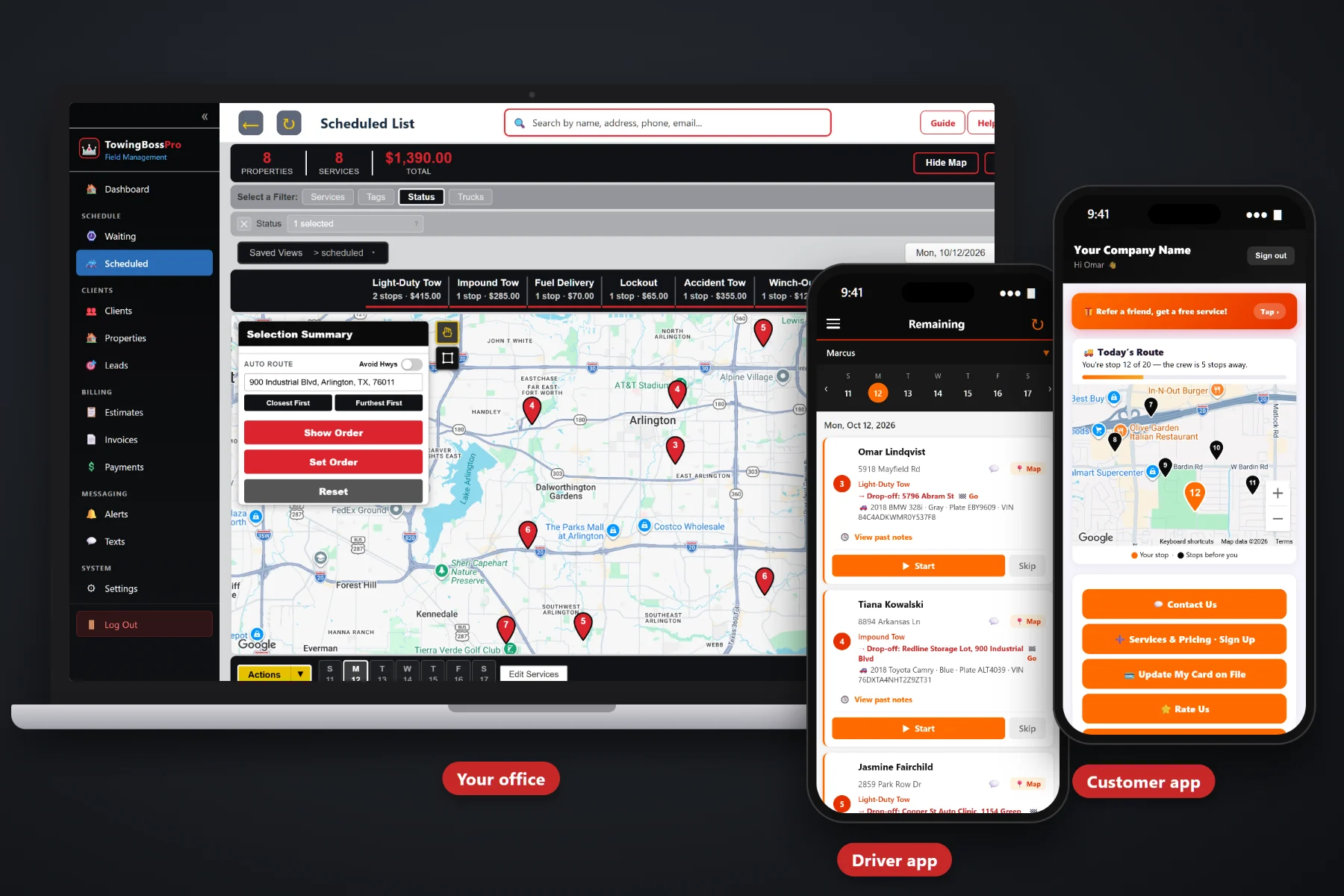
Running a towing company means juggling calls at 2 a.m., a second truck that needs a driver, accounts that want clean invoices, cars piling up in the yard, and a phone that never stops on storm nights. TowingBossPro puts your calls, trucks, drivers, accounts, storage, and billing in one place so you can add a truck, hire a driver, and take on new work without the whole business living in your head.
TowingBossPro starts at $59/month, and it covers the whole call: the incoming call, the dispatch, the driver, the vehicle, the storage, the invoice, and the review request afterward. No per-user fees, so hiring a driver or a dispatcher never means rethinking your software bill.
Every incoming call lands on a live map. Circle a group of calls or select them and assign them to a driver and truck in one step.
Every call carries a pickup and a drop-off address plus the year, make, model, color, plate, and VIN, so the driver knows exactly what he is hooking.
On-the-way and arrival texts, invoices, and payment follow-ups go out automatically, and the office texts customers from the system instead of a personal phone.
Invoice straight from completed calls, keep a card on file, take online payments, and auto-bill regular accounts. Close the gap between the drop-off and the money landing.
Give dispatchers, office staff, and drivers their own logins with role-based access. Never billed per user, so every driver can be on the app.
Drivers see their calls in order with pickup, drop-off, vehicle details and notes, take vehicle photos, clock in, start and complete calls, and send on-the-way and arrival texts.
A car in a ditch on an icy night cannot wait. A scheduled dealer transport can. The Waiting List shows every incoming call on a live map by category, so when the phone lights up you can see what is where, batch nearby calls to one truck, and keep customers updated by text. Nothing gets lost in a group text.
The best system in the world is useless if your drivers go back to calling you for the drop-off address. TowingBossPro keeps the office side complete and the driver side simple, so the whole company runs from the same information.
Import your customers and commercial accounts by CSV. Old tickets can stay in the filing cabinet. Start with what tonight's calls need.
Incoming call, Waiting List, dispatch, driver app, completed call, invoice, payment. Each step picks up where the last left off, so nobody retypes the same VIN three times.
Calls in order, the pickup and drop-off, the vehicle details, the notes, a camera for vehicle photos, a time clock, and a complete button. That is the whole call on a phone.
On-the-way texts, invoices, payment follow-ups, and auto-billing run on their own, whether you are on a recovery, at an account, or finally taking a night off.
One truck and an owner who drives every call can run on memory, a clipboard, and a group text. Two trucks and a hired driver cannot.
The day you add a second truck is the day you find out how much of the business lives only in your head. Which entrance the body shop wants you to use. Where the keys are at the dealer lot. Which car in the yard came in on the 3rd and which on the 13th. Which account gets billed monthly. None of that transfers on a clipboard.
Generic field service software treats a tow like any other service call, with one address field and the drop-off crammed into the notes. TowingBossPro is built around how towing actually runs. Start with Towing Business Software: The Complete Guide for Towing Company Owners.
Get the calls, the trucks, the storage, and the billing out of your head and into one system, and growth stops feeling like chaos.
Every tool in TowingBossPro serves one of three jobs: capture every call with the right details, get the right truck to the right vehicle, and turn finished calls into collected money.
Incoming calls land on a live map. Circle a group of calls or select them and assign them to a driver and truck in one step.
See each truck's day with calls in route order, move work between trucks, and let auto-routing put the stops in a sensible order.
Every call has a real pickup address and a real drop-off address, so nothing important hides in a notes field.
Year, make, model, color, plate, and VIN on every call, visible to the office and the driver.
Light-Duty Tows, Heavy-Duty Tows, Roadside, Accident & Recovery, Impound & Storage, and Transports, so you can see how each line of work performs.
Body shops, dealers, and fleets get an account with their calls and invoices grouped under it, so last month's bills are seconds away.
Vehicles in storage carry a daily rate that is added to the invoice, so storage days are counted instead of guessed.
Calls in order, pickup and drop-off, vehicle details, notes, start and complete, vehicle photos, and on-the-way and arrival texts.
Drivers clock in and out in the app, so hours are on record and easy to check against the calls that were run.
Give dispatchers, office staff, and drivers their own logins with access set by role, so everyone sees what they need and nothing they shouldn't.
Updates, invoices, and reminders go out automatically, and the office can text customers back and forth from the system.
Customers watch a live map of the driver on the way, see invoices, pay online, keep a card on file, and choose their alerts.
Referral and rate-us options in the customer app make it easy for happy customers to spread the word.
Send estimates for transports and bigger jobs and let customers approve them online before the truck rolls.
Invoice from completed calls without retyping, with sales tax calculated, and see what is paid and what is still out.
Keep cards on file, auto-bill regular accounts, take online payments, and let payment follow-ups chase overdue invoices.
Calls, revenue, and unpaid invoices in one place, so a weekly check-in takes minutes instead of an afternoon.
Bring your customer and account list over from a spreadsheet or another system in one go.
The jump from one truck to two is where most towing company owners feel the strain. TowingBossPro gives every driver the information you used to carry in your head, and gives you a clear view of every truck without riding along. Thinking about that step? Read When to Add a Second Truck to Your Towing Business.
Towing cash gets tight when invoices go out a week late, storage days go uncounted, and accounts pay when they get around to it. TowingBossPro keeps the whole chain moving: completed call, invoice, storage charges, payment, follow-up. Want the money side first? Read Getting Paid Faster in a Towing Business: Card on File, Online Payments, and Auto-Billing.
Hiring a driver should be a business decision, not a software decision. Pick the plan that fits your stage and move up when the company does.
14-day free trial. No credit card required.
Owner-level guides on adding trucks, hiring and keeping drivers, new service lines, storms and busy nights, knowing your numbers, commercial accounts, reviews, referrals, and growing from one truck to a fleet. Start with the first and work forward.
Yes. Every call has a pickup and a drop-off address plus the vehicle's year, make, model, color, plate, and VIN. Work is organized into Light-Duty Tows, Heavy-Duty Tows, Roadside, Accident & Recovery, Impound & Storage, and Transports, and storage adds a daily rate to the invoice.
Yes. Incoming calls land on the Waiting List map, where you can circle or select calls and assign them to a driver and truck in one step. The dispatch board shows each truck's day with route order and auto-routing, and every driver gets his calls in the driver app.
Just a phone. The driver app shows calls in order with pickup, drop-off, vehicle details, and notes, takes vehicle photos, includes a time clock, sends on-the-way and arrival texts, and lets the driver start and complete each call.
Yes. Body shops, dealers, property managers, and fleets can be set up as accounts with their calls and invoices grouped under the account, plus card on file and auto-billing.
Never. TowingBossPro is never billed per user, so every driver, dispatcher, and office person can have a login.
Start is $59/mo, Pro is $89/mo, and Crew is $199/mo. Every plan starts with a 14-day free trial and no credit card.
TowingBossPro runs the whole towing operation — calls, dispatch, drivers, accounts, storage, and billing — from one platform. See the full TowingBossPro platform overview.
Put your calls, trucks, accounts, storage, and billing in one place. Try TowingBossPro free for 14 days.