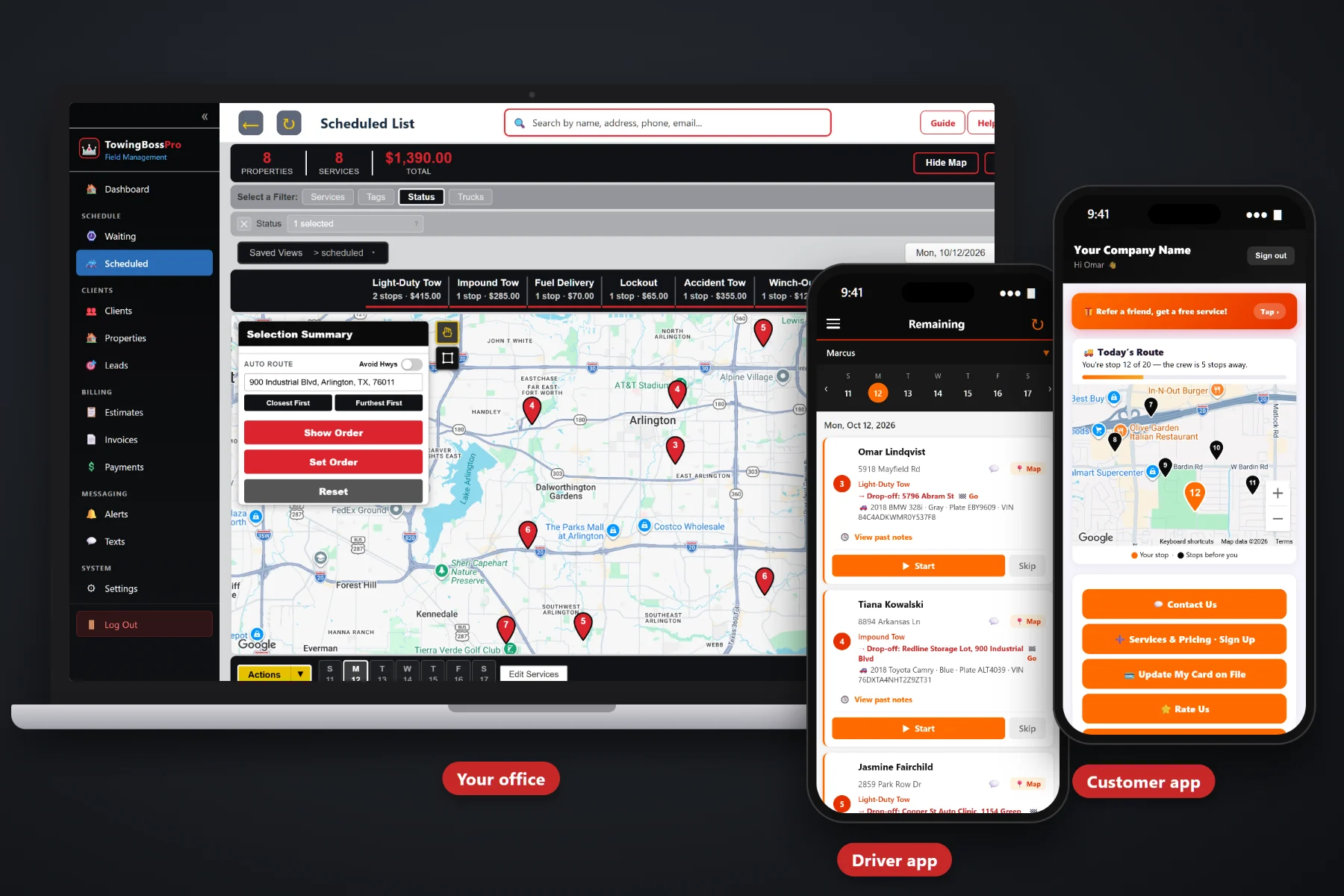
Hooking the car is the part your drivers are good at. The call written on a fuel receipt, the drop-off nobody confirmed, the group text that scrolled away, the storage days nobody counted and the account invoice that went out two weeks late are what eat your margin. TowingBossPro runs the whole towing and roadside company in one system — from the call to paid.
Plans start at $59/month, but TowingBossPro is not a contact list with a calendar bolted on. It knows where every open call is, where each vehicle is going, which driver and truck has it, what is sitting in your yard and what every account still owes — and you are never billed per user, so adding a driver never adds to the bill.
Incoming calls land on a live map. Circle calls or select them and assign them to a driver and truck in one step.
The Scheduled list shows every truck's calls by day in route order, with auto-routing to put the stops in a sensible sequence.
Every call carries a pickup and a drop-off address, both on the map and in the driver app, plus year, make, model, color, plate and VIN.
Calls in order, one-tap navigation, vehicle details, notes, start and complete, vehicle photos and one-tap on-the-way and arrival texts.
Motor clubs, police and municipal, body shops, dealers and property managers keep calls and invoices under the account. Storage vehicles carry a start date and daily rate.
Completed calls become invoices with storage days and sales tax. Card on file, auto-billing, online payments and payment follow-ups.
This is the heart of TowingBossPro. The call lands on the Waiting List with a pickup, a drop-off and the vehicle details. Dispatch assigns it to a driver and truck, it moves to the dispatch board in route order, the driver works it from the app, and the completed call becomes an invoice that can be paid online or charged to the card on file. Nothing gets re-read over the radio, and nothing lives on a whiteboard. For the full walkthrough, read Towing Software: The Complete Guide for Towing and Roadside Companies.
Most field service software is built for trades that go to one address and fix something, and towing gets squeezed into fields that don't fit. TowingBossPro is built around calls with two ends, vehicles, trucks, accounts and the yard. Bring in your customers, add your drivers and trucks, and you can run tomorrow's calls from it.
Bring your customer list in by CSV, then add your repeat locations, commercial accounts, drivers and trucks. You can be dispatching real calls the same day you sign up.
The Waiting List and dispatch board show every open call and every truck. Light-Duty Tows, Heavy-Duty Tows, Roadside, Accident & Recovery, Impound & Storage and Transports are easy to tell apart.
Drivers see their calls in order, navigate to the pickup and drop-off with one tap, take vehicle photos and tap complete. No clipboard and no radio calls asking for the plate.
On-the-way and arrival texts go out with one tap, automated texts and emails handle the routine updates, and payment follow-ups chase the invoices that sit.
Every tow has two ends, a vehicle, a driver, a truck and a customer who may or may not be the one paying. Some end at a shop, some at a dealer, some in your yard for weeks — and every hand-off is a chance for something to fall through.
Most towing companies run on paper call sheets, a whiteboard in dispatch and a group text to the drivers. It works until the first freeze doubles the calls, until a driver drops a car at the wrong shop because the drop-off was never written down, until a vehicle sits in the yard for three weeks and leaves without anybody counting the storage days, or until the dispatcher who remembers every account is out sick. Generic software doesn't help, because it has no place for pickup and drop-off addresses, VINs, storage start dates or commercial accounts.
TowingBossPro does. Calls wait on a live map, trucks sit on the dispatch board, drivers carry both ends of every tow in the app, and every completed call turns into an invoice. It's built around the way a towing and roadside company actually runs.
This page covers the hub — how all the pieces connect. To see each piece in more depth, explore the full TowingBossPro platform.
Every tool in TowingBossPro was built with towing and roadside work in mind — not adapted from a generic service app and called good enough.
Incoming calls show as pins on a live map, so dispatch can see clusters, outliers and what is still waiting at a glance.
Circle calls on the map or select them and assign them to a driver and truck in one step.
The Scheduled list shows every truck's calls by day, in route order, so same-day calls and scheduled transports share one board.
Set the order by hand or let auto-routing put each truck's stops in a sensible sequence.
Both addresses on the map and in the driver app, with one-tap navigation to each.
Year, make, model, color, plate and VIN on every call, so drivers find the right vehicle and accounts can match invoices.
Light-Duty Tows, Heavy-Duty Tows, Roadside, Accident & Recovery, Impound & Storage and Transports each get their own category.
Jump starts, lockouts, tire changes, fuel delivery and winch-outs dispatched and billed like any other call.
Calls in order, pickup and drop-off, vehicle details, notes, access notes, start and complete, and vehicle photos.
Photos at pickup and drop-off stay with the call, ready when a customer asks about a dent a week later.
On-the-way and arrival texts from the driver app, automated texts and emails, and two-way texting in one thread per customer.
Customers watch a live map of the driver on the way, see invoices, pay online, keep a card on file and choose their alerts.
Save the body shops, dealerships and lots you tow to every week, with notes that travel with the location.
Motor clubs, police and municipal, body shops, dealers and property managers keep their calls and invoices under the account.
Vehicles in storage carry a storage start date and a daily rate, and storage days are added to the invoice.
Send an estimate for a transport or recovery job and let the customer approve it online before the truck rolls.
Completed calls become invoices with the customer, vehicle and service already on them, with sales tax applied.
Keep a card on file for repeat customers and auto-bill the accounts set up for it. Payment follow-ups chase the rest.
See calls by category, revenue, unpaid invoices and account balances so you know how each truck and each week is really doing.
Drivers and trucks are records in the system, and the time clock keeps hours next to the calls.
Bring your customer list over from a spreadsheet or your old system instead of typing it in one name at a time.
Add drivers, dispatchers and office staff without a per-seat bill. The Crew plan includes unlimited users.
Try it with your own customers, trucks and calls for 14 days. No credit card required to start.
The steady money in towing comes from accounts and from the yard — and that is exactly where it leaks. A dealer's transport that never got billed, a body shop invoice that sat for a month, a car that left storage without anyone counting the days. TowingBossPro keeps every account's calls and invoices under the account, and every stored vehicle carries a storage start date and a daily rate so the storage days land on the invoice. Learn how in Getting Storage Days Onto the Invoice Every Time.
The driver taps on-the-way and the customer gets a text — and can watch the truck coming on a live map in the customer app. He navigates to the pickup with one tap, takes vehicle photos, loads it, navigates to the drop-off and taps complete. The completed call becomes an invoice with the vehicle, the service, any storage days and sales tax already on it, and the customer pays online or the card on file is charged.
Pick the plan that fits your operation. Adding a driver, a dispatcher or an office helper never adds a per-seat charge, and every plan starts with a 14-day free trial.
No credit card required. 14-day free trial. Never billed per user.
Every call has a pickup address and a drop-off address, both on the map and in the driver app, plus the vehicle's year, make, model, color, plate and VIN, notes and access notes, the assigned driver and truck, vehicle photos from the driver app and a call category.
Incoming calls land on a Waiting List shown on a live map. You can circle calls or select them and assign them to a driver and truck in one step. Assigned calls move to the dispatch board, organized by truck and day, with route order and auto-routing.
Yes. Motor clubs, police and municipal customers, body shops, dealers and property managers can be set up as accounts, with their calls and invoices kept under the account. TowingBossPro does not connect to motor club dispatch platforms or police rotation systems; those calls are entered like any other call.
Yes. Vehicles in storage carry a storage start date and a daily rate, and storage days are added to the invoice. Storage, impound and release rules vary by state and city, so set your rates and process to match what applies to you.
Yes. Completed calls become invoices with sales tax applied, customers can pay online through the customer app, you can keep a card on file, auto-bill accounts set up for it and send payment follow-ups on unpaid invoices.
Start is $59/month, Pro is $89/month and Crew is $199/month with unlimited users. You are never billed per user. Every plan starts with a 14-day free trial and no credit card is required.
Light-duty and heavy-duty tows, roadside calls, accident and recovery, impound and storage and transports all run from the same platform. See the full TowingBossPro overview.
Practical guides on running a towing and roadside company from one system: call intake, dispatch, drivers, accounts, impound and storage, customer texts and getting paid. Start with Towing Software: The Complete Guide for Towing and Roadside Companies.
TowingBossPro keeps every call, driver, truck, account, stored vehicle and invoice in one place, so your drivers tow more and your office chases less. Try it free for 14 days.